
QR Code & Barcode System32.0 - Google Play
You'll be able to see results in few seconds.
Publisher Description
Read and save any QR Code & Barcode. Inventory tracker. Backup/restore feature.
Simple Commercial Barcode & QR Code System
And Now with Revenue Report!
Keep track your profit, cost and revenue by daily, weekly, monthly or all time!
Fast QR Code and Barcode Reader and Saver
Inventory tracker enables you to keep track of stock numbers of your products.
Calculation module enables you to sum prices of items scanned and reduce stock numbers when you do "sale".
This is the DEMO version and have some restrictions.
You can install FULL PRO version from here.
https://play.google.com/store/apps/details?id=com.pmobile.barcodeapppro
In PRO version:
+ Export database to XLS file support
+ Import XLS file to database support
+ Limitless code recording.
How To use?
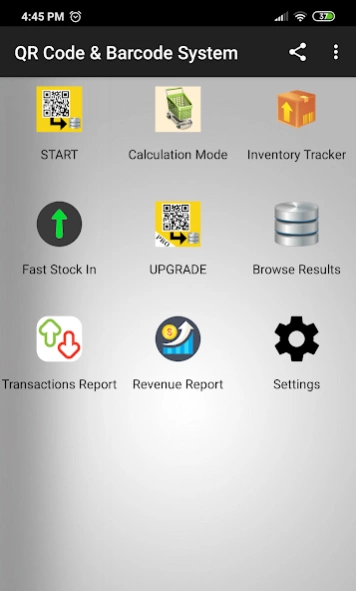
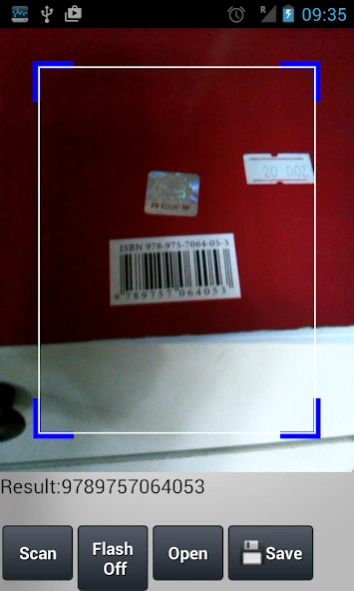
* Simply touch "Start" button and preview QR Code by using camera of your device.
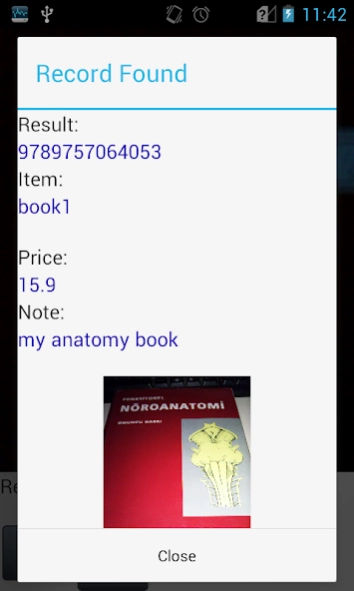
* If the scanned code is saved before, the details will be shown.
* You can disable this from "Settings" page.
* You can switch Flash ON/OFF when light is not enough.
* You can read and save to database QR Codes and barcodes.
* By "Inventory Tracker" button you can manage stock infos of records. Select an item to add stock input/output.
* By "Transactions Report" button you can see DAILY, WEEKLY and MONTHLY stock transactions.
* By "Browse Results" button you can search and filter in saved codes. By selection one of them, you can edit or delete it.
* Exporting and importing results support is available only at PRO version.
* By "Export Results" support you can export results to an XLS file. The file is saved to "qrcode_reader_exports" directory in your SD Card. (in PRO version only)
* By "Import Results" support you can import data from an XLS file located in \"qrcode_reader_exports\" directory into database. (in PRO version only)
You can add image to records at Browse->Record Details page.
Touch Edit button, touch Select Image button and touch Save button.
Calculation Mode Usage
1. Scan the barcode. If a record found, the item will be listed and the price will be summed.
2. Touch Scan button to scan and add new items.
3. Touch the item to edit number of copy.
4. Touch the cancel button on the item to remove from list.
Contact pmobilesoft@gmail.com for your questions and suggestions.
A possible usage scenario for a tradesman:
You can find price of your products by scanning barcode of it.
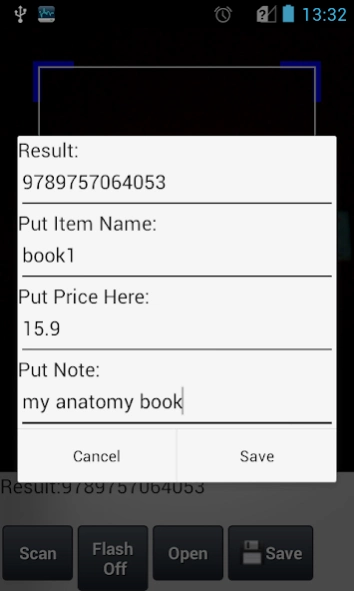
1. Firstly, scan and save barcodes of your products along with their price. By this way, you build your own barcode database.
2. Then, when needed, scan a product barcode and the price info you saved before will pop up.
It is HIGHLY recommended to export results to a file regularly to avoid DATA LOSS. Then, you can import the exported file to recover database.
About QR Code & Barcode System
The company that develops QR Code & Barcode System is Murat Öksüzer. The latest version released by its developer is 32.0.
To install QR Code & Barcode System on your Android device, just click the green Continue To App button above to start the installation process. The app is listed on our website since 2019-11-16 and was downloaded 0 times. We have already checked if the download link is safe, however for your own protection we recommend that you scan the downloaded app with your antivirus. Your antivirus may detect the QR Code & Barcode System as malware as malware if the download link to com.pmobile.barcodeapp is broken.
How to install QR Code & Barcode System on your Android device:
- Click on the Continue To App button on our website. This will redirect you to Google Play.
- Once the QR Code & Barcode System is shown in the Google Play listing of your Android device, you can start its download and installation. Tap on the Install button located below the search bar and to the right of the app icon.
- A pop-up window with the permissions required by QR Code & Barcode System will be shown. Click on Accept to continue the process.
- QR Code & Barcode System will be downloaded onto your device, displaying a progress. Once the download completes, the installation will start and you'll get a notification after the installation is finished.
Program Details
System requirements
Download information
Pricing
Version History
version 32.0-demo
posted on 2019-11-17
version 31.0-demo
posted on 2019-10-05
Create invoice ability added.
Revenue report added.
version 29.0-demo
posted on 2019-09-07
Revenue report added.
version 22.0-demo
posted on 2017-02-05
## PLEASE VOTE TO SUPPORT US ##
+ Inventory tracker is added.
+ DAILY, WEEKLY, and MONTHLY transaction report screen added.
+ Adding image to records is added.
+ Calculation mode added.
Disclaimer
Official Google Play Link
We do not host QR Code & Barcode System on our servers. We did not scan it for viruses, adware, spyware or other type of malware. This app is hosted by Google and passed their terms and conditions to be listed there. We recommend caution when installing it.
The Google Play link for QR Code & Barcode System is provided to you by apps112.com without any warranties, representations or guarantees of any kind, so access it at your own risk.
If you have questions regarding this particular app contact the publisher directly. For questions about the functionalities of apps112.com contact us.
